SMH - Simply Magical Healer World of Warcraft AddOn
- Dowloads
- Release Notes
- Options Help - General
- Options Help - Healing
- Options Help - Algorithm
- Options Help - Character Priority
- Options Help - Priority
- Options Help - Overhealing
- Options Help - Profiles
- Options Help - Ranks
- Options Help - Tiers
- Programming using SMH
- Wish List
- How To
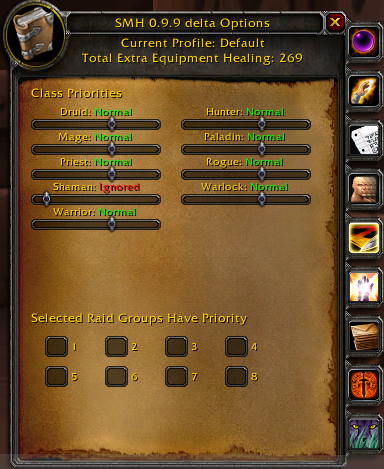
The options window has some features that are common to each of the tabs it contains. The version of the addon always appears in the top of the window. Just below that is the name of the currently active profile. Just below that is the amount of +healing that is provided by equipment. Note that the +healing from equipment can appear in green or red. If in red, it means there is an equipped item that should provide +healing, but it is broken. If in green it means none of the +healing equipment is broken. Next to the +healing from equipment Priests can have +healing from Spiritual Guidance. On the right side of the window are icons that represent each of the tabs containing different configuration options. If you place the cursor on each of the tabs, a tooltip appears indicating what types of options appear when pressing that tab.
Class Priorities indicate where members of specified classes should appear on the healing tiers. Normal means nothing special happens with recipients of that class. High means recipients of that class are healed above others, and Low means below others. Ignored means recipients of this class are not healed.
Selected Raid Groups Have Priority acts like setting the Class Priorities to high except it is for all members of the specified raid subgroups irrespective of class.